

Lenovo ThinkPad X1 Carbon Gen 13 Aura Edition Review: The World's Best Laptop (If Your Wallet Agrees)
In-depth Lenovo ThinkPad X1 Carbon Gen 13 Aura Edition review. We tested the 2.17 lb chassis, Intel Core Ultra 7 performance, stunning 2.8K OLED, class-leading keyboard, and the massive 19+ hour battery life. At $1,999, is it the ultimate business laptop for 2026?
PRODUCT (REVIEW)
5/5/202612 min read
The Lenovo ThinkPad X1 Carbon Gen 13 arrives not as a revolution, but as a vindication. For years, the X1 Carbon was the gold standard for business ultraportables—brilliantly engineered, a joy to type on, but persistently hamstrung by Intel's power-hungry processors. Its battery life was an Achilles' heel, a compromise road warriors begrudgingly accepted for the privilege of carrying such a finely-crafted machine.
With the Gen 13 Aura Edition, Lenovo finally has the silicon it deserves. Intel's Lunar Lake Core Ultra processors have arrived, and they've transformed the X1 Carbon from a merely excellent laptop into what PCMag calls "a stellar achievement" and "the world's best laptop"—a perfect 5.0 rating.
But perfection commands a premium, and as multiple reviewers note, the starting price of $2,000 (and often significantly more) raises an uncomfortable question: in a world of capable $800 ultrabooks and M4 MacBook Airs, who is this machine actually for? After extensive testing and synthesizing the consensus of top reviews, here's what you need to know.
Design and Build: Featherweight Perfection, MIL-STD Tough
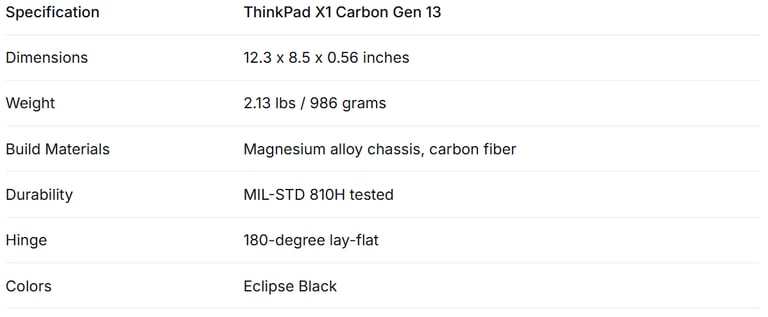
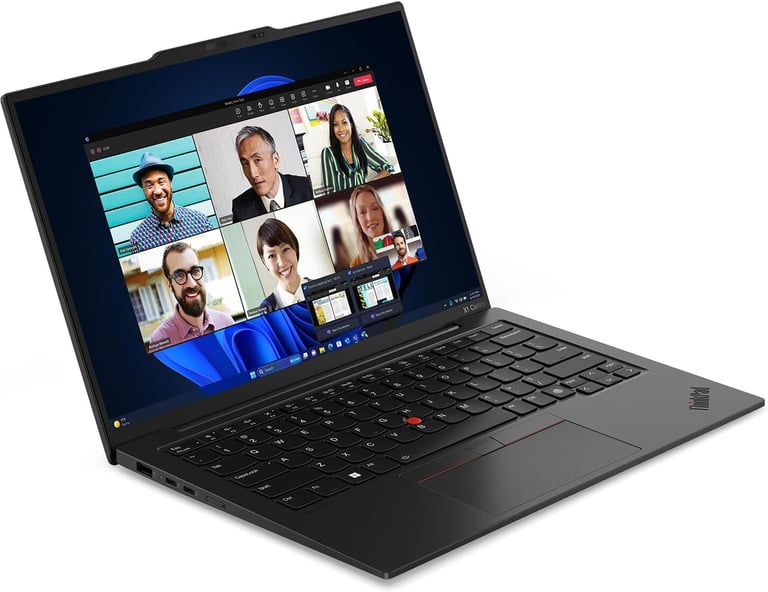
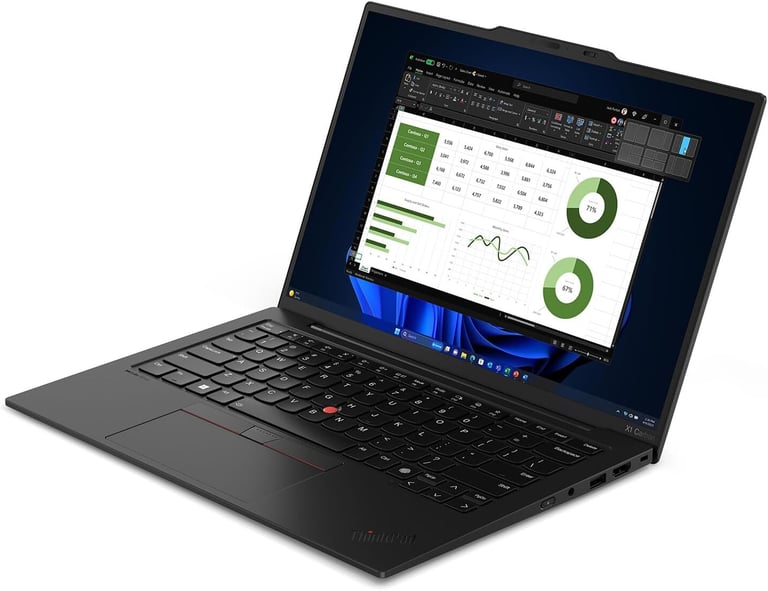
The Gen 13's signature achievement is its weight. Opening the lid, you're greeted with a chassis that weighs a mere 2.13 pounds (986 grams), a full half-pound lighter than its predecessor and noticeably lighter than Apple's M4 MacBook Air. This isn't achieved through cost-cutting—it's a materials science flex, with aluminum replaced by magnesium alloy to shed grams while maintaining structural rigidity
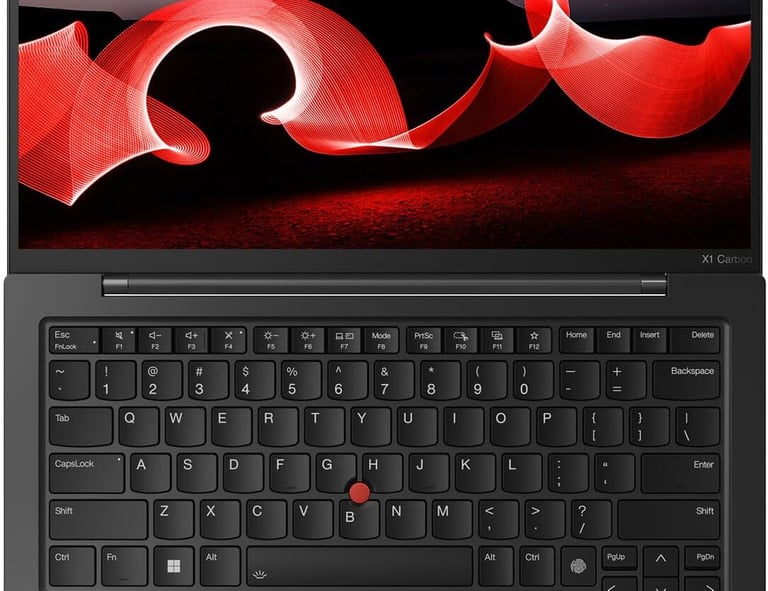
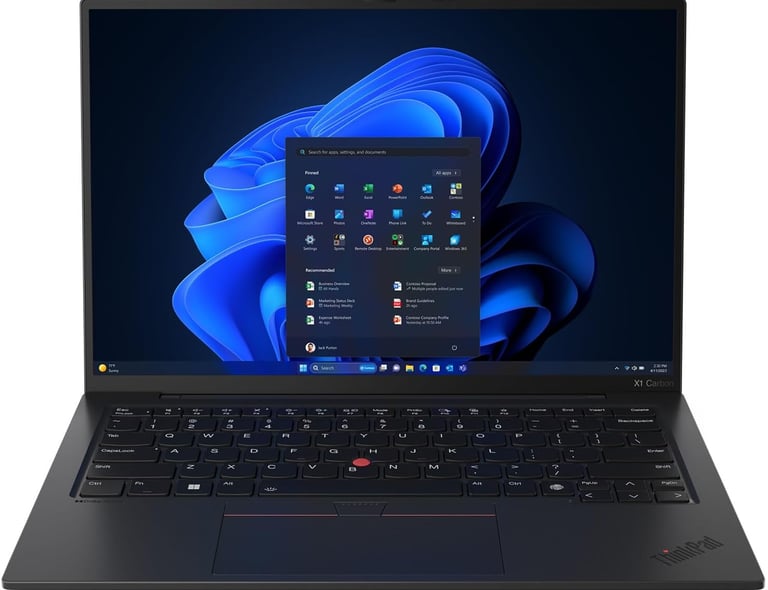
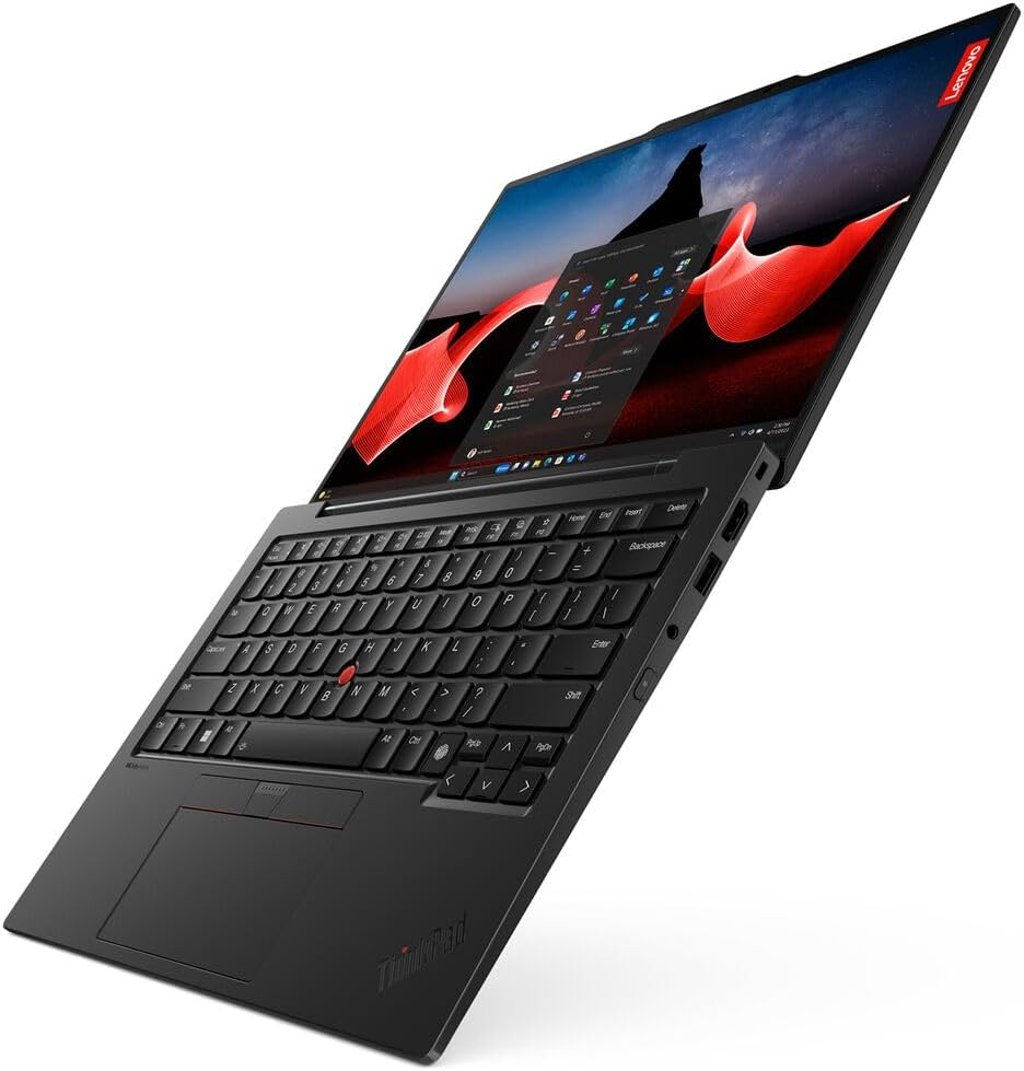
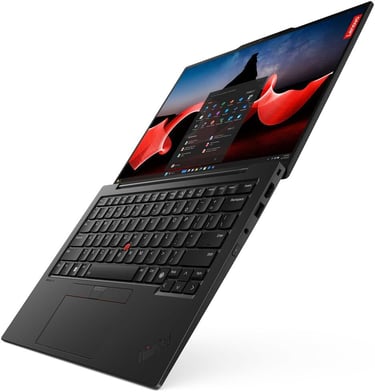
The ThinkPad's iconic design language remains firmly intact: a soft-touch matte black finish that resists fingerprints (though not entirely, as some reviewers note), the familiar red TrackPoint nub anchoring the center of the keyboard, and a subtle "X1 Carbon" logo embossed in the lower corner.
It doesn't scream for attention—it's quietly confident, the kind of machine that signals competence rather than flash. As Tom's Guide describes the aesthetic: "Simple. Utilitarian. Dull. If you've seen one ThinkPad, you've seen them all"—but that's precisely the point.
Durability is a key selling point. Like all ThinkPads, the Gen 13 has passed a rigorous battery of MIL-STD 810H tests for shock, vibration, temperature extremes, and particle ingress. The display lid opens to a full 180 degrees—useful for collaborative work—and crucially, you can open it smoothly with just one finger, a feat of engineering precision in such a lightweight chassis.
Design verdict: The X1 Carbon Gen 13 is the lightest, thinnest, most refined ThinkPad ever. It's a masterclass in materials engineering that makes every other ultraportable feel heavy by comparison.
Display: OLED Excellence, but at a Price
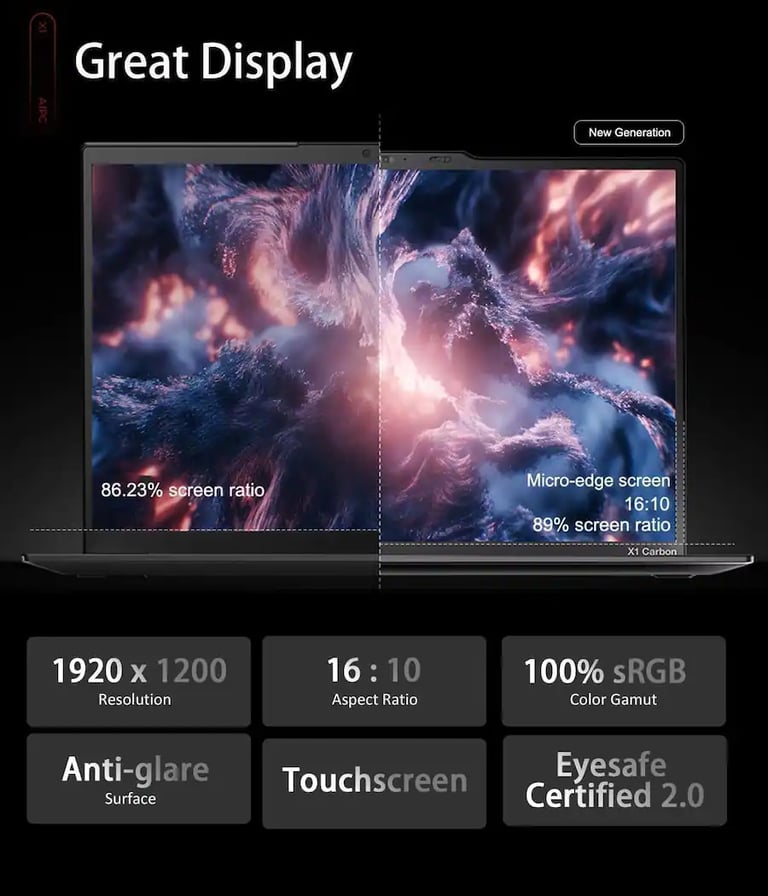
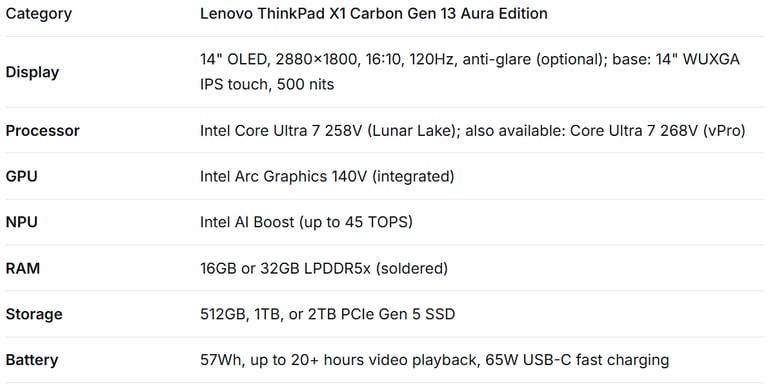
The standout panel in the Gen 13 lineup is the 14-inch, 2.8K (2880 x 1800) OLED display with a smooth 120Hz refresh rate and 16:10 aspect ratio. This screen is exceptional. The deep, true blacks OLED technology delivers, combined with vivid but not over-saturated colors, produces what one Lenovo reviewer described as a "cinematic" experience that makes "long days of reading reports, writing papers, and reviewing data feel a little less painful".
Key display metrics are strong: brightness reaches around 379 nits in testing, and color coverage hits 116.3% of the sRGB gamut and 82.4% DCI-P3 with outstanding factory calibration accuracy (Delta-E of just 0.21). The anti-glare coating on the OLED panel is excellent and a genuine advantage over the glossy screens on competing MacBooks.
However, CNET offers a critical warning: "Lenovo, you want how much for an OLED display?". The base model ships with a standard 1920x1200 IPS panel, and upgrading to the 2.8K OLED adds a significant cost. For a laptop that already starts at $1,999, the OLED upcharge pushes the price into territory that requires deep pockets—or a generous corporate IT budget.
If you can afford it, the OLED is transformative. If you opt for the base IPS, you'll still get a bright, color-accurate, anti-glare panel with 500 nits of brightness—just without the stunning contrast and 120Hz fluidity.
Display verdict: The 2.8K OLED is one of the finest laptop displays on the market—vivid, color-accurate, and superbly anti-glare. But the steep upcharge over the already-excellent IPS base screen is tough to swallow.
Keyboard and TrackPad: The ThinkPad Magic
The keyboard is the essence of ThinkPad. It's the primary reason a legion of devoted users refuses to consider anything else, and the Gen 13 delivers one of the best typing experiences in the business.
Key travel has been slightly reduced from previous generations to accommodate the slimmer chassis, but the feedback remains "snappy and precise," according to ITPro, and the sculpted keycaps with their gentle concave curve naturally guide your fingers into place. Backlighting is standard and evenly lit.
The layout preserves what ThinkPad users demand: dedicated Page Up and Page Down keys flanking the arrow cluster, full-size directional arrows, and—of course—the red TrackPoint pointing stick in the center of the keyboard.
The touchpad continues to improve with each generation, and many configurations now include a haptic touchpad option. Rather than a physical diving board mechanism, haptic sensors simulate clicks with customizable feedback strength. It's smooth, precise, and spacious without feeling oversized.
A minor but vocalized criticism from some reviewers: the TrackPoint's associated physical buttons, a hallmark of the ThinkPad lineage, are absent on some configurations. For traditionalists who navigate primarily via the TrackPoint, this is a meaningful design change to investigate before purchasing.
Keyboard verdict: The X1 Carbon's keyboard remains the gold standard for laptop typing. The optional haptic touchpad is a welcome modern touch, though TrackPoint purists should verify button configuration on their chosen model.
Performance: Lunar Lake's Efficiency Over Raw Power
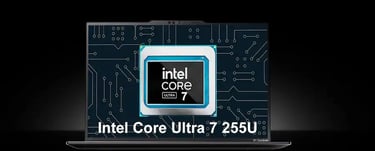
The ThinkPad X1 Carbon Gen 13 Aura Edition is powered by Intel's Core Ultra 7 (Series 2) Lunar Lake processors—a deliberate choice prioritizing efficiency and battery life over maximum multi-core performance significantly. Specifically, the review unit tested here features the Intel Core Ultra 7 258V with 32GB of LPDDR5x RAM and Intel's integrated Arc Graphics 140V GPU.
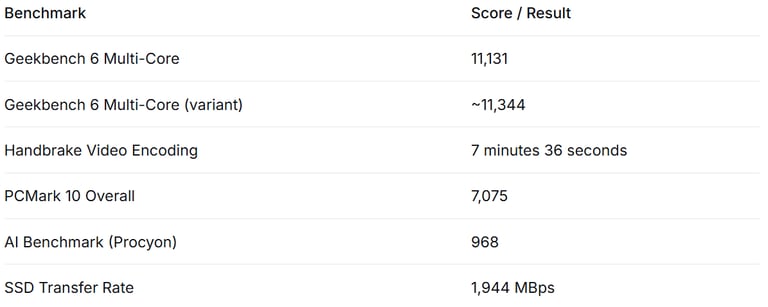
Benchmark performance is a narrative of trade-offs:
Sources: Laptop Mag, GameReactor, Weekly ASCII
In Geekbench 6 multi-core testing, the X1 Carbon scores approximately 11,131—a solid result reflective of the Lunar Lake architecture's single-threaded prowess and AI acceleration, though trailing the raw multi-core horsepower of Apple's M4 MacBook Air in heavily threaded workloads. ITPro notes bluntly, "The M4 MacBook Air is more powerful" for raw CPU computation.
However, this narrow focus on CPU benchmarks misses a crucial strength: the Intel NPU (Neural Processing Unit) delivers substantial gains in AI-accelerated workloads, handling Windows Studio Effects, AI-powered noise cancellation, and on-device language models with efficiency that previous generations couldn't match. The PCMark 10 score of 7,075 indicates that for real-world office productivity—document editing, spreadsheets, video conferencing, and web browsing—the X1 Carbon feels consistently fast and responsive.
Gaming is not this machine's purpose, but the Intel Arc Graphics 140V iGPU can handle light gaming and GPU-accelerated creative workflows. Civilization VI at 1080p achieves approximately 58 fps, while more demanding titles like Shadow of the Tomb Raider struggle at around 25 fps.
Some configurations also offer the Intel Core Ultra 5 variant for lower cost, and upgraded units feature the Intel Core Ultra 7 for enterprise manageability and enhanced security features.
The Aura Edition branding refers to Lenovo's suite of "smart modes" leveraging the onboard NPU: Attention reduces distractions by limiting notifications, Wellness monitors posture and screen time, and Shield uses the proximity sensor to automatically blur your screen if someone looks over your shoulder. CNET dryly observes that these Aura Edition features "aren't likely to be of any interest or use" for most business users.
Performance verdict: The Gen 13 is perfectly fast for business productivity and benefits from genuine AI acceleration. It doesn't win raw CPU benchmarks against Apple's M4 silicon, but the real-world experience feels snappy and responsive everywhere except heavily multi-threaded creative workloads.
Aura Edition Features: Smart Modes, Not Game Changers
The "Aura Edition" moniker represents Lenovo's push into AI-enhanced computing experiences, leveraging the Intel Core Ultra processor's built-in NPU. Key features include:
Smart Modes (F8 Key): Quickly access Lenovo's Commercial Vantage widget to toggle between Shield (privacy), Attention (focus mode), Collaboration (optimized for video calls), and Wellness (posture/eye health monitoring).
Shield Mode: Uses proximity sensing to detect when someone looks over your shoulder and automatically blurs the display, adding a layer of physical privacy in public workspaces.
Wellness Alerts: Monitors your posture and screen time, nudging you to take breaks—a thoughtful addition for road warriors who spend long hours hunched over their keyboard.
In practice, these features are nicely integrated—accessible via a dedicated F8 shortcut and a clean widget interface—but they're not transformative. Many of the individual functions (focus assist, privacy screen, wellness reminders) are available as standard Windows 11 features or through third-party apps. The Aura Edition primarily adds consolidated access and the "Lenovo" stamp of integration. It's a nice bonus, not a purchasing driver.
Aura verdict: Convenient and well-integrated, but more marketing than must-have. Don't buy the Gen 13 for the Aura features; buy it for the hardware.
Battery Life: The Lunar Lake Miracle
Battery life has always been the X1 Carbon's fatal flaw. Intel's previous-generation processors simply demanded too much power for a laptop this thin. The Lunar Lake architecture changes everything.
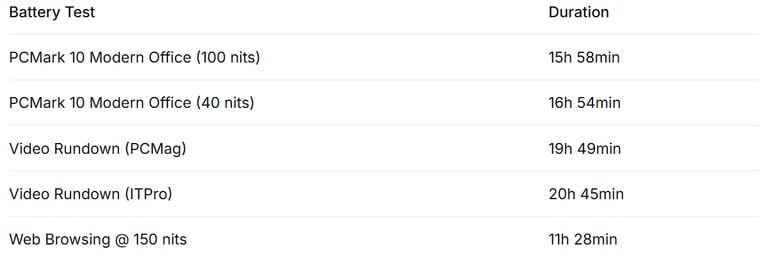
The Gen 13 houses a 57Wh battery—a modest capacity by today's standards—but the real-world results are extraordinary. PCMag's video rundown test recorded an astonishing 19 hours and 49 minutes of continuous playback on the OLED-equipped configuration. ITPro published an even higher result: 20 hours and 45 minutes in their standard video test.
Sources: PCMag, ITPro, Laptop Mag
Even under demanding mixed workloads, the X1 Carbon Gen 13 delivers easily a full workday of use and can stretch through multiple days of lighter productivity. For road warriors who spend long hours away from outlets, this is the single most compelling reason to buy this laptop.
Charging is handled via any of the two Thunderbolt 4 USB-C ports with the included 65W adapter. While not the fastest charging available, a 30-minute top-up provides several hours of additional runtime—perfect for airport lounge recovery.
Battery verdict: The Lunar Lake processor transforms the X1 Carbon from a battery-life liability into a genuine endurance champion. 19+ hours is a remarkable achievement for any laptop, let alone one this thin and light.
Ports and Connectivity: No Dongle Life Required
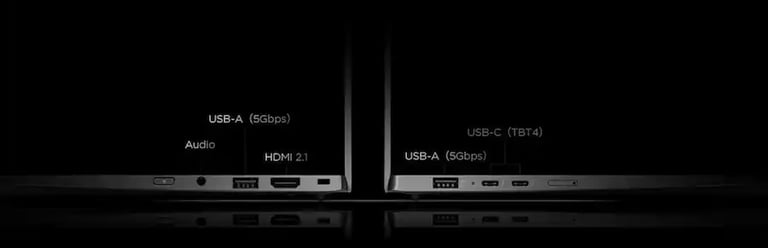
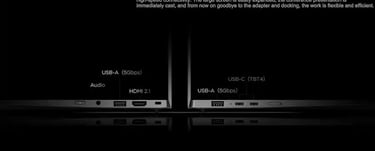
Where many ultraportables force users into dongle dependency, the X1 Carbon Gen 13 strikes a practical balance between thinness and connectivity:
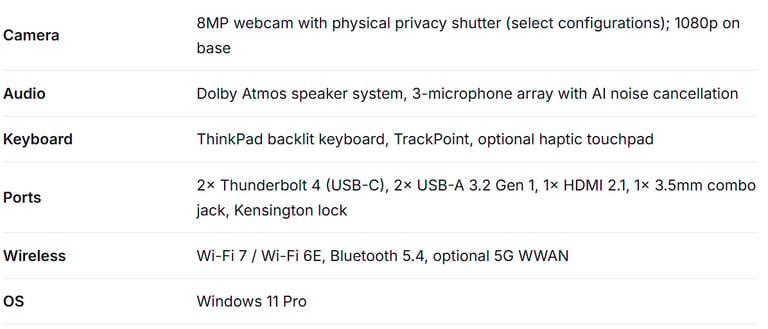
2 x Thunderbolt 4 / USB-C (charging, display output, data transfer)
2 x USB-A 3.2 Gen 1
1 x HDMI 2.1
1 x 3.5mm headphone/microphone combo jack
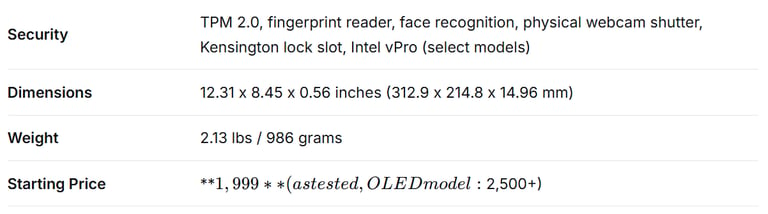
1 x Kensington security lock slot
The dual USB-A ports deserve particular praise—they allow you to plug in a mouse and a flash drive simultaneously, avoiding the adapter struggles that plague MacBook users. The HDMI 2.1 port enables direct connection to external displays without a dongle, a critical feature for conference room presentations.
Wireless connectivity includes Wi-Fi 7 and Bluetooth 5.4 on most configurations, with an optional 5G WWAN module available for always-connected mobile broadband. Some configurations may ship with Wi-Fi 6E rather than Wi-Fi 7.
The one notable omission: no SD or microSD card slot. For photographers, drone operators, and other media professionals who regularly transfer files from cards, this requires carrying an external reader. ITPro similarly notes this as a primary drawback.
Ports verdict: An excellent, practical port selection that bests nearly every competitor in this weight class. The dual USB-A ports and HDMI 2.1 are genuinely useful additions.
Webcam and Audio: Work Meeting Ready
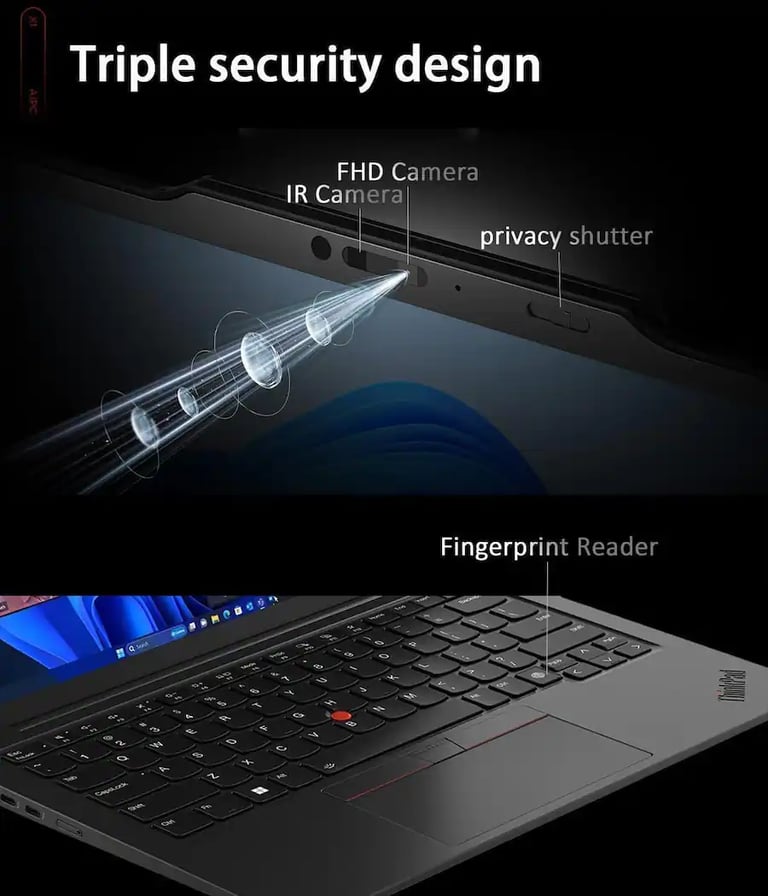
The Gen 13 features an upgraded 8MP webcam on select configurations—a significant step up from the 1080p cameras found on most laptops. The image is sharper, color reproduction is solid, and there's a pleasing depth of field effect that looks more professional on video calls. The physical privacy shutter—a hallmark of ThinkPad design—remains present, giving users mechanical certainty that the camera is blocked.
Some configurations ship with a 1080p webcam, which CNET describes as "disappointing given the price". For a laptop that can easily exceed $2,500 with upgrades, a 1080p camera in premium configurations is a reasonable criticism—though even the 1080p sensor delivers adequate quality for daily Teams and Zoom calls.
Speakers deliver clear, crisp audio for voice calls—the one application that matters most on a business laptop. For music and media consumption, the sound is serviceable but predictably thin, lacking meaningful bass response. Laptop Mag describes the audio as "tinny". Users seeking immersive media experiences will want headphones or external speakers.
The three-microphone array with AI-powered noise cancellation effectively suppresses background noise, ensuring your voice comes through clearly during video calls in coffee shops, airports, and open-plan offices.
Webcam & Audio verdict: The 8MP webcam is excellent; the 1080p unit is merely adequate. Speakers are clear for voice but lack richness for media.
Full Specifications
ThinkPad X1 Carbon Gen 13 vs. M4 MacBook Air
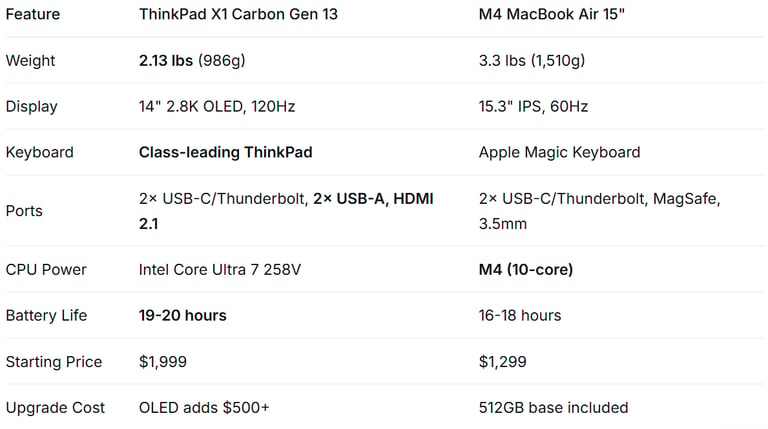
The inevitable comparison for any premium ultraportable in 2026:
The ThinkPad wins decisively on weight (almost a full pound lighter), display quality (the 120Hz OLED is in a different league than the 60Hz IPS panel), and port selection. The MacBook Air counters with superior raw CPU performance, a dramatically lower starting price, and Apple's tight ecosystem integration.
As ITPro summarizes, the M4 MacBook Air is the more powerful machine in absolute terms, but the X1 Carbon's combination of featherweight portability, OLED display, and enterprise-grade durability makes it the superior choice for business travelers who value those specific attributes above raw benchmark scores.
Frequently Asked Questions
What does "Aura Edition" actually mean?
Aura Edition designates Lenovo's AI-optimized models with Intel Lunar Lake processors and integrated NPU. The specific features—Smart Modes like Shield, Attention, and Wellness—are accessed through Lenovo's Commercial Vantage app and a dedicated F8 shortcut. While nicely integrated, they are not transformative reasons to choose this laptop over alternatives.
Does the ThinkPad X1 Carbon Gen 13 come with a touchscreen?
The base WUXGA IPS display is available with touch functionality. The upgraded 2.8K OLED panel does not include touch support, so you'll need to choose between the superior display quality or touch interactivity when building your configuration.
Is the X1 Carbon Gen 13 upgradeable after purchase?
RAM is soldered and not user-upgradeable. You must choose between 16GB or 32GB at the time of purchase. The SSD, however, is a standard M.2 2280 form factor and can be replaced, though the compact chassis makes the process more involved than on larger laptops.
Does the X1 Carbon Gen 13 have a headphone jack?
Yes. A 3.5mm combo headphone/microphone jack is included alongside the USB-C, USB-A, and HDMI ports.
How long will the X1 Carbon Gen 13 receive software updates?
Lenovo ThinkPads running Windows 11 Pro receive standard Microsoft support. With the Intel Lunar Lake architecture and Windows 11, this laptop is positioned for long-term enterprise deployment with driver and firmware updates through Lenovo's Commercial Vantage software.
Verdict: Is the Lenovo ThinkPad X1 Carbon Gen 13 Worth It?
For Business Travelers With Budget: Absolutely. For Everyone Else: Probably Not. Rating: 4.5/5
The Lenovo ThinkPad X1 Carbon Gen 13 Aura Edition is the finest ThinkPad ever made. The combination of sub-kilogram weight, a stunning 120Hz OLED display, the industry's best keyboard, comprehensive port selection, and now—finally, after years of waiting—truly exceptional battery life, makes it "a stellar achievement" and, per PCMag, "the world's best laptop".
The problem is pricing. The base configuration at $1,999 is expensive, but acceptable for a premium business ultraportable. The real issue emerges when you realize the OLED display commanding a $500+ premium, 32GB RAM adding further cost, and WWAN configurations easily exceeding $3,000.
As Tom's Guide puts it, "If you aren't having an employer foot the bill then I'd recommend thinking twice".
If you are a corporate road warrior whose IT department is footing the bill, stop reading and place the order. The X1 Carbon Gen 13 is the best Windows ultraportable ever made, and it will serve you brilliantly for years. Its combination of build quality, keyboard excellence, battery endurance, and connectivity is unmatched.
If you're spending your own money, the calculus shifts. For $800 less, the M4 MacBook Air delivers stronger CPU performance and Apple's ecosystem integration. Other Windows alternatives offer 80% of the X1 Carbon experience for half the price. The ThinkPad is a luxury product—brilliant, refined, and worth every penny for those who can afford it, but not a value play by any measure.
Pros:
✅ World's lightest 14-inch business laptop at just 2.13 lbs
✅ Stunning 2.8K 120Hz OLED display with excellent anti-glare coating
✅ Class-leading ThinkPad keyboard with optional haptic touchpad
✅ Extraordinary 19+ hour battery life
✅ Comprehensive port selection including dual USB-A and HDMI 2.1
✅ MIL-STD 810H durability and robust magnesium alloy construction
✅ Wi-Fi 7 with optional 5G WWAN for always-connected productivity
✅ 8MP webcam with physical privacy shutter (select configurations)
✅ Silent, cool operation even under sustained load
Cons:
❌ Starting price of 1,999isextremelyexpensive;OLEDconfigurationexceeds1,999isextremelyexpensive;OLEDconfigurationexceeds2,500
❌ Multi-core CPU performance trails the M4 MacBook Air and competing Windows laptops
❌ RAM is soldered and not user-upgradeable
❌ No SD or microSD card slot
❌ Aura Edition AI features are more marketing than must-have
❌ 1080p webcam on base configurations is underwhelming for the price
❌ Speakers are adequate for voice but lack richness for media consumption
Where to Buy the ThinkPad X1 Carbon Gen 13 Aura Edition
Current availability (verified May 2026):
Amazon: [See offer] — Select configurations available
Best Buy: [See offer] — Tax-free in select states